 Ahmed Al Mansoori
Give a computer a goal instead of a command, and it starts making its own decisions about how to get there. That shift, from following instructions to choosing them, is the entire premise behind Agent Zero AI, and it changes what a server can actually do for you.
Most tools wait for you to tell them exactly what to click. Agent Zero AI doesn’t. It reads a task, writes its own code, runs that code, checks the result, and adjusts course if something breaks—all without a person refreshing the screen every ten seconds. Running this kind of framework properly starts with the ground it is built on, which is why the choice between a shared web hosting plan and a proper cloud hosting setup matters more here than it does for a static website.
In this post, we will explore what Agent Zero AI actually is, how its architecture works, whether it’s safe to run on your machine, what resources it needs, and how to get it installed and working from scratch.
Table Of Content
What Is Agent Zero AI?
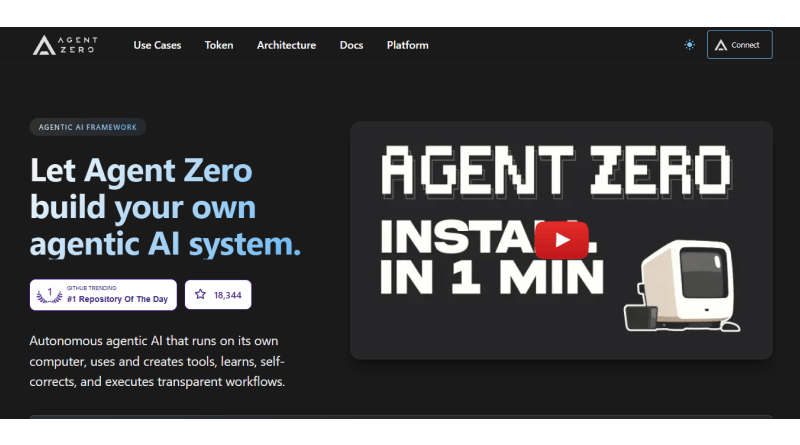
Agent Zero AI is an open-source, Python-based agent framework that runs inside Docker and treats the operating system itself as a tool. Instead of being locked into a fixed set of pre-built functions, it can write shell commands, execute scripts, browse the internet, and remember what happened in previous sessions, building context the same way a person would after working on a project for weeks. That combination of code execution, browsing, and persistent memory puts it in a different category from earlier autonomous agents like AutoGPT, AgentGPT, or Hermes Agent, which mostly stuck to scripted, task-specific loops rather than genuinely improvising their approach.
What Are the Key Features of Agent Zero AI?
Agent Zero stands apart by leaning entirely on prompts instead of hardcoded rules, giving developers a framework that adapts rather than one that just executes. The features below show exactly how that flexibility plays out in practice.
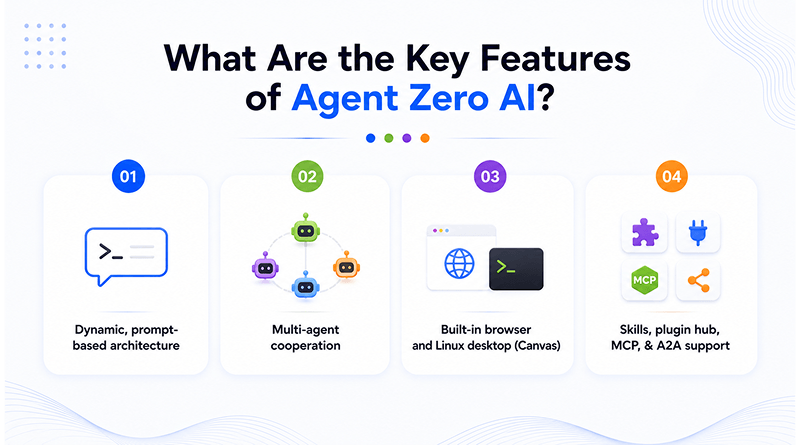
Dynamic, prompt-based architecture
The agent’s behavior isn’t hardcoded. Its instructions live in editable prompt files, so you can reshape how it reasons and responds without touching a single line of the underlying Python code.
Multi-agent cooperation
A primary agent can spin up subordinate agents for specific subtasks, hand off work, and pull the results back together, which mirrors how a small team might split a project rather than one person doing everything alone.
Built-in browser and Linux desktop (Canvas)
The framework features its own visual workspace, letting the agent interact with a real desktop environment instead of only working through a terminal. Teams comparing this setup against other automation stacks often start by researching Agenta AI or similar platforms to see how prompt orchestration differs across tools.
Skills, plugin hub, MCP & A2A support
Agent Zero connects to external tools and other agents through the Model Context Protocol and Agent-to-Agent standards, and its skills library means you’re rarely building integrations from scratch. Developers often compare available options before deciding on a technology stack.
Is Agent Zero AI Safe to Use?
Yes, if it runs inside Docker isolation. No, if it runs unsandboxed on a machine you actually care about.
The risk comes from the same thing that makes Agent Zero powerful: it can access the full file system, install packages, modify its code, and run commands, and nothing built in stops it from doing something destructive. There’s no confirmation dialog asking “Are you sure?” before it deletes a directory or overwrites a config file. Running it directly on a personal laptop, next to your documents and credentials, isn’t a risk worth taking.
The fix is straightforward: keep it inside a Docker container, deploy it on an isolated VPS rather than a shared production server, restrict its API keys to only what a task genuinely requires, and set clear network rules so it can’t reach systems it has no business touching. A dedicated VPS hosting environment gives the agent room to operate without putting anything else at risk, which is really the only sane way to let an autonomous system have this much freedom.
Related Read: What is Jellyfin? How to Set Up Your Free Netflix Alternative with Docker
What Are the Limitations of Agent Zero AI?
As with any emerging tool, Agent Zero AI has a few rough edges worth knowing before you build anything critical on top of it. The agent can lose track of long, multi-step tasks if a prompt isn’t specific enough, executing irrelevant steps before resuming the original goal.
Its dependency on the connected language model also means output quality shifts depending on which model you’ve integrated it with. Documentation is still catching up to the pace of development, so troubleshooting often means reading through community discussions rather than an official guide. None of this makes the framework unusable; it just means treating it as an actively evolving project rather than a finished product and building in checkpoints where a person reviews what the agent has done before it moves to the next step.
Related Read: What Is Ackee?
What Are the System Requirements for Agent Zero AI?
A minimum of 4GB RAM will get Agent Zero running, but 8GB is where things start feeling smooth, especially once you’re running multiple sub-agents or handling larger context windows. On the CPU side, two cores cover light usage, though four cores handle concurrent tasks far more comfortably. Storage matters more than people expect — NVMe drives noticeably speed up Docker’s read/write cycles, which adds up when the agent is constantly writing logs, pulling packages, and executing scripts.
Before you install anything, make sure Docker and Git are already on your server. And if you’re managing infrastructure across several environments, automating the deployment through IaC tools saves you from configuring each server every time.
How Do You Install Agent Zero AI?
Installing this tool requires a foundational setup that ensures high performance and consistent uptime. Proper configuration at this stage prevents compatibility issues as your project scales.
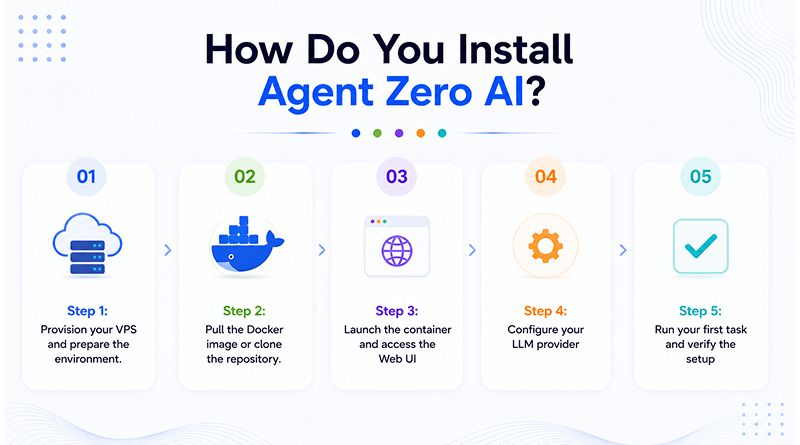
Step 1: Provision your VPS and prepare the environment.
Choose a server that meets the RAM and storage recommendations above, then update your packages before installing anything else.
bash
sudo apt update && sudo apt upgrade -y
Step 2: Pull the Docker image or clone the repository.
bash

git clone https://github.com/frdel/agent-zero.git

cd agent-zero

docker compose up -d
Step 3: Launch the container and access the Web UI
Once the container finishes starting, open your browser and navigate to the local port assigned to Agent Zero, typically localhost:50001, to reach the setup dashboard.
Step 4: Configure your LLM provider
Agent Zero needs a model to power its reasoning. You can connect it to a hosted provider using an API key or point it towards a local Ollama instance if you’d rather keep everything running on your local hardware. Either choice affects how fast and how capable the agent is, so base your choice of AI models on how complex the tasks you’re automating really are.
bash

export OPENAI_API_KEY="your-key-here"
Related Read: Ollama Models List: Top AI Models You Can Run Locally
Step 5: Run your first task and verify the setup
Give the agent something small and low-risk first, summarizing a file or running a basic script, before trusting it with anything that touches production data or live systems.
What Are the Best Practices for Running Agent Zero AI?
Getting Agent Zero installed is the easy part; getting consistent, useful output out of it takes a bit more discipline. Start every new project with a specific prompt rather than a broad goal, as clear instructions help the agent maintain operational accuracy. Review its memory files occasionally, because outdated context from an old task can quietly influence how it handles a completely unrelated one later on.
Set resource limits on the container itself so a runaway loop can’t consume the entire server, and log every session so you can trace back exactly what the agent did if something doesn’t look right. Teams that treat these practices as non-negotiable, rather than optional extras, tend to achieve far more reliable behavior out of the framework over time.
What Are the Common Use Cases for Agent Zero AI?
Agent Zero AI excels at handling complex workflows by streamlining repetitive operations and technical tasks. By delegating these functions to an autonomous system, you increase overall efficiency and maintain focus on high-level architecture.
Coding automation
The agent writes, tests, and debugs the code, reducing the manual review a developer would otherwise need to do.
Research
Provide it a topic, and it scans through different sources automatically, then generates a summary worth reading.
Robotic process automation
Tasks like data entry or repetitive clicks, the kind someone used to do the same way every single day, now run without a person at the keyboard.
Content workflows
Utilize a controlled sandbox to draft and refine text. You can deploy these outputs straight to live environments using integrated AI website tools.
Self-hosted document management
Pairing the agent with platforms like Nextcloud to organize and retrieve files as part of a larger automated workflow.
Concluding Insights
Agent Zero AI represents a genuine shift from tools that wait for instructions to systems that analyze a task and act without manual intervention. Its open architecture, memory, and multi-agent design give it real flexibility, but that same flexibility is why isolation and access control matter from day one.
A properly sandboxed setup, protected with SSL security and paired with a reliable IDE for development work, turns a genuinely powerful but unpredictable framework into something you can actually rely on. Get the foundation right, keep the maintenance consistent, and Agent Zero AI becomes less of an experiment and more of a dependable part of how you build going forward.
FAQs
1. Is Agent Zero free?
Yes. Agent Zero AI is open-source and free to download and run. The only costs you’ll take on are your shared server or VPS and, if you connect it to a hosted model instead of a local one, whatever API fees that provider charges.
2. What are the minimum VPS specs for Agent Zero?
You’ll need at least 4GB of RAM and two CPU cores to get it running, though 8GB and four cores handle real workloads far more comfortably. Pair that with an NVMe drive for faster Docker read/write performance.
3. Can Agent Zero run without Docker?
Technically, yes — but it’s not something we’d recommend. Docker runs the agent in its own container, sandboxed from the files and processes on the rest of the system. Running it directly on your host system removes that protection and puts your whole machine at risk.
4. Does Agent Zero work with local LLMs?
Yes. You can connect it to a local model through Ollama instead of relying on a hosted provider, which keeps everything running on your own hardware and avoids sending data outside your server.